NEW · TOOL OF THE DAY · 10 NOVEMBER 2026
Elicit: A Research Assistant That Can Search the Literature—But Not Replace the Researcher
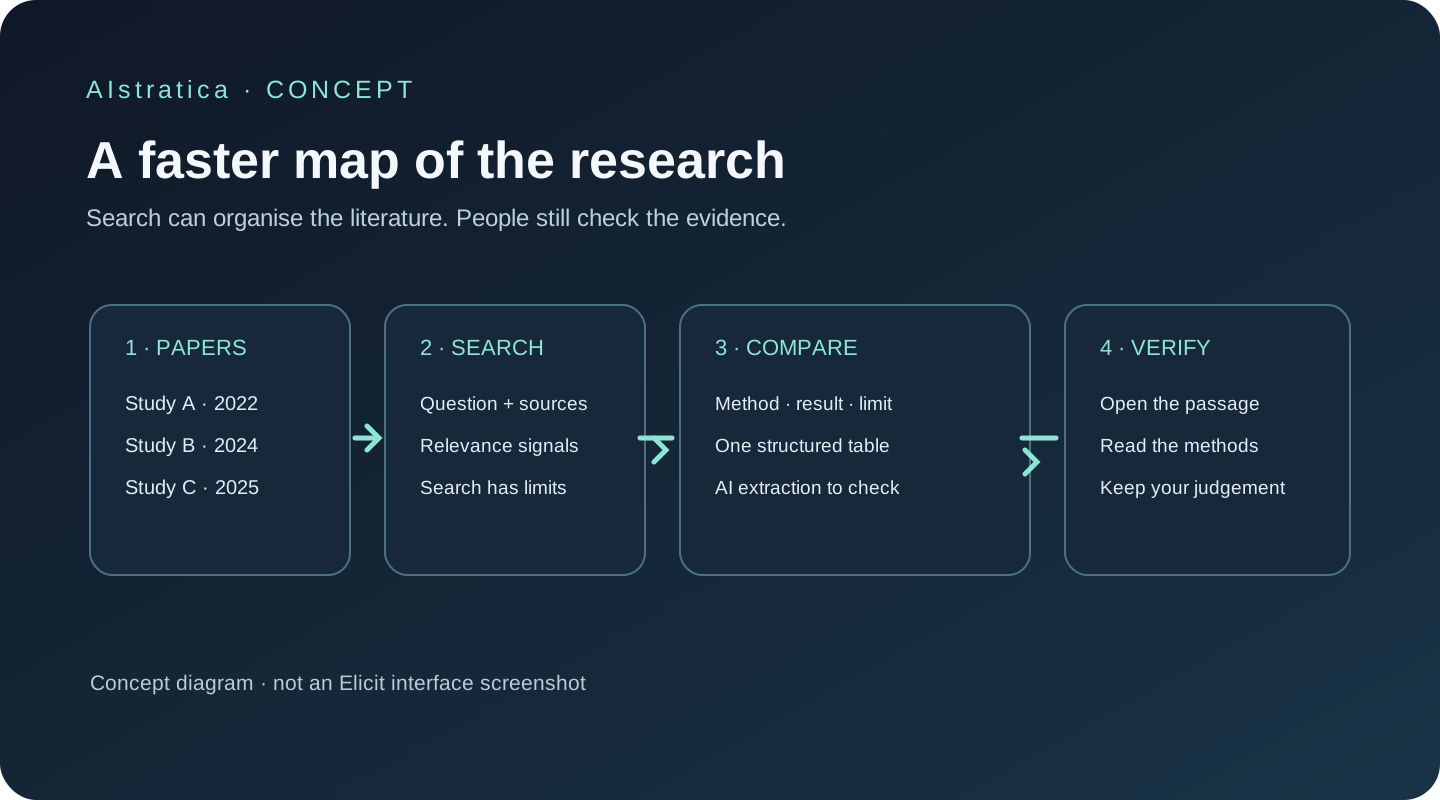
An independent, documentation-based review. The opening scenario below is illustrative; AIstratica did not conduct hands-on product testing for this review.
At the end of a long day in Islamabad, a doctoral student has a familiar problem: not a shortage of papers, but too many of them. One article measures a result; another questions the method; a third is frequently cited but barely relevant to the precise research question. The student needs a map of the literature before deciding what deserves a close read.
That is the job Elicit is built to help with. It searches academic work, organises evidence into tables, and can help move a review from a broad question toward a structured set of papers. It can shorten the hunt. It cannot decide what the evidence means for you.
What Elicit actually does
Elicit is a research assistant developed by Elicit Research, PBC. Its official site is elicit.com. It is aimed at students, academics, analysts and research teams who need to find and compare published work. The company says its academic corpus contains more than 138 million papers; its help centre says the Research Agent can also search the wider web and accept up to 100 uploaded resources per session, with a stated 10GB total upload limit. These are product descriptions, not independent audits of corpus coverage.
The product now groups several jobs into three workflows: a Research Agent for flexible questions, Research Reports for a structured overview, and Systematic Review for a more controlled evidence-review process. Elicit says its former “Find Papers,” “Extract Data” and “Chat with Papers” tools became skills within the Research Agent on 30 September 2026. This is useful to know if an older tutorial sends you hunting for a button that has moved.
Think of Elicit as a research librarian who can search very quickly and prepare a comparison sheet. The librarian may still misfile a book, miss one on a different shelf, or misunderstand a passage. You remain responsible for checking the catalogue and reading the relevant pages.
Six features worth understanding
1. Natural-language academic search
Instead of guessing the exact database keywords, you can describe a question in ordinary language. Elicit’s semantic search tries to find papers with related meaning. This is useful at the scoping stage—for example, “What evidence links school phone bans to student attention or achievement?”—when the right terminology is not yet obvious.
Semantic search is not a reproducible search strategy by itself. Search results depend on the product’s corpus and ranking. For a formal review, record the exact databases, search strings, dates and filters, then use Boolean keyword search where your protocol requires it.
2. Research Agent sessions
The agent can work across academic papers, the wider web and uploaded materials. Its workflow can combine searching, reading and creating a response or table. A policy analyst could ask it to identify studies on electricity demand from data centres, then separate measured observations from scenarios and projections.
The agent is flexible, but each workflow uses the plan’s usage pool. A long, multi-part question may consume more than a quick lookup. Break a large task into narrower questions, inspect the sources it found, and check that the answer has not quietly broadened the scope.
3. Evidence tables and extraction
Elicit can put selected papers into a table and answer user-defined questions about each paper, such as study design, sample, outcomes or stated limitations. The value is comparison: a consistent column makes differences easier to spot than a pile of abstracts.
An extracted cell is an AI-generated reading aid, not a verified data point. Check its supporting source text, particularly for sample sizes, effect estimates and causal claims. If the paper does not contain the requested information, treat a blank or uncertain answer as more responsible than a confident guess—and verify either way.
4. Research Reports
Reports are designed to give a structured overview of a topic space and can be a useful orientation before deeper reading. Elicit says reports can draw from many academic sources, and its current pricing page lists up to 135 data sources for the Pro tier. This describes platform functionality, not the quality or completeness of every report.
A report is a starting point. It can overrepresent what is easy to retrieve, combine studies that are not truly comparable, or make a thin literature look more settled than it is. Read the cited papers and look for disagreement, missing populations and publication dates.
5. Systematic Review workflow
On Pro and higher plans, the guided workflow supports gathering papers, screening titles and abstracts, optional full-text screening, extracting data and producing a report. The help centre says Pro can include up to 5,000 gathered papers per review, though the final report’s default selection and plan limits are smaller. Elicit advertises “up to 80%” time savings; that is the company’s claim, not a result independently established by this review.
The workflow can make a review more manageable, but it does not make it automatically systematic or publication-ready. Researchers must set defensible inclusion rules, assess study quality, log decisions and check exclusions. A screening model can apply criteria consistently and still apply the wrong interpretation consistently.
6. Exports and research hand-off
Paid plans add exports such as CSV, RIS, BIB, PDF and DOCX, which can help transfer results into reference managers or a research team’s workflow. Zotero import is listed on the free Basic plan. For a researcher who already has a disciplined reference process, this may be more valuable than another generated summary.
Confirm which file format and export options your plan includes before building a workflow around them. Keep the original papers and your own decision log; an exported AI table should not become the sole record of how a literature review was conducted.
Try Elicit in 20 Minutes
Project: Map the first evidence on a focused question, without pretending to finish a literature review.
- Visit elicit.com and start with the Research Agent. The labels and options may change as Elicit updates the product.
- Use a narrow question. For example: “Among studies published since 2018, what evidence measures the effect of school phone restrictions on student attention or academic outcomes? Separate observational from experimental studies.”
- Ask for a table with columns for citation, country, population, study design, outcome measured, main finding, limitation, and a source passage supporting each entry.
- Ask Elicit to identify which claims are direct findings and which are the authors’ interpretation. Ask it to flag papers that appear only indirectly relevant.
- Open at least three papers, including one that complicates the apparent pattern. Check the methods and context, not only the abstract.
- Save the search question, date, filters and papers you decide to keep. The twenty-minute outcome is a checked reading list and a better-defined question—not a finished review.
Copyable prompt:
Find academic studies relevant to: [insert one focused question]. For each study, report the citation, year, country, population, method, outcome, main result and stated limitation. Attach source references to every factual answer. Separate what the study measured from what its authors infer. Flag uncertainty, missing information and papers that do not directly answer the question. Do not combine results into a causal conclusion unless the designs support that conclusion.
Pricing and plans
Pricing was checked on Elicit’s official pricing page on 10 November 2026. Listed paid prices are per user, per month, with annual billing. The page has monthly and yearly billing options; only the annual-billing figures below are verified here, so check the live page before subscribing. Prices are USD, before any applicable tax, and may differ for academic or nonprofit users.
| Plan | Price checked 10 Nov 2026 | What the official page lists | Practical note |
|---|---|---|---|
| Basic | Free | Unlimited search over 138M+ papers, unlimited summaries and paper chat; limited Research Agent and Research Reports usage; Zotero import | Good for trying searches and reading individual papers; agent usage is limited |
| Plus | $11/month, billed as $132 annually | Standard Research Agent and Report usage; exports; five table columns at a time; clinical-trial search | A modest step up for regular research; confirm monthly checkout price |
| Pro | $39/month, billed as $468 annually | Five times the usage for Research Agent, Reports and Systematic Reviews; review workflow; up to 5,000 papers screened; Routines and API access | For structured reviews and heavier use; usage is still finite |
| Scale | $89/month, billed as $1,068 annually | Nine times the usage of Basic; collaboration; figures extraction; up to 200 data sources | Designed for teams; confirm seat needs and monthly checkout price |
| Enterprise | Custom | Custom usage, enterprise controls and larger review capacity | Ask Elicit for a quote and review the contract terms |
There is no need to pay simply to see whether the search style suits you. Try a narrow question on Basic first. The main price trap is not a hidden per-paper fee on this page; it is assuming that “unlimited search” means unlimited use of the more compute-intensive agent and report workflows. It does not.
How it compares
| Tool | Distinctive strength | Best suited to | Trade-off |
|---|---|---|---|
| Elicit | Academic discovery, evidence tables and structured review steps | Researchers comparing published studies | Coverage and AI extraction require independent checking; systematic review tools are paid |
| Perplexity | Web-first answers with links across current websites and documents | Broad research and finding current sources | A cited web answer is not a systematic academic search; sources vary in quality |
| Gemini Notebook | Ask questions across a user-selected collection of sources and return source-linked answers | Students and analysts working from known documents | It organises what you provide; discovery across academic literature is not its primary distinction |
| Semantic Scholar | Free academic search and paper discovery with citation context | Finding papers and following research connections | Less focused on an end-to-end AI-assisted extraction and review workflow |
No single tool does all four jobs equally well: finding the web’s latest reporting, mapping academic literature, understanding your own documents, and judging research quality. For broad web discovery, see AIstratica’s Perplexity research guide; for a source collection you already have, see our Gemini Notebook review.
What doesn’t work well
A large corpus is not a complete corpus. A search over 138 million papers sounds vast, but the relevant paper may be missing, poorly indexed, paywalled or described under different terms. Check major subject databases and reference lists when completeness matters.
Citations do not certify the answer. A citation can point to a real passage that has been misunderstood, stripped of a qualification or used to support a claim it does not establish. Open the source and check methods, sample, and surrounding text.
Screening remains a research judgement. “Systematic review” is a method, not a button. Your question, search protocol, inclusion criteria, quality appraisal and exclusion log still need human oversight. Elicit’s workflow can assist; it cannot confer methodological validity by itself.
Usage limits are a real purchasing consideration. Basic limits agent and report use. Paid tiers provide defined levels rather than an unlimited guarantee. Larger tasks, thorough screening and complex extraction can draw down usage, so estimate the workload before a deadline.
Confidentiality deserves attention. Elicit’s privacy policy describes personal-data handling, but its publicly available policy is dated September 2023. Do not upload sensitive, unpublished or regulated documents until you have checked current terms, account controls and any institutional agreement. The Trust Center offers additional vendor information, but that remains vendor-provided assurance.
AIstratica’s verdict
Best for: People who need to find and compare academic studies, especially when a question is narrow enough to check paper by paper.
Worth trying? Yes. Basic offers a useful way to explore the search experience and work with individual papers, though the agent and reports have limited usage.
Worth paying for? Potentially, for researchers who regularly build evidence tables or run systematic reviews. Start with the free plan, estimate how often you will use the agent, and verify current billing and academic pricing before committing.
Biggest strength: It connects literature discovery with structured comparison, so the researcher can spend less time building the first spreadsheet by hand.
Biggest limitation: A clean table can make uncertain or incomplete extraction look more settled than it is. Verification is not an optional finishing touch; it is part of the method.
This assessment is based on Elicit’s current product documentation, help centre, pricing page and privacy materials, plus independent editorial analysis. AIstratica did not claim hands-on testing. Elicit may make a literature search less lonely and less repetitive. The judgment about what the evidence means still belongs to the person asking the question.